Castforge 1.0 · Coming soon

Your AI dev team,
working as one.

Castforge runs a team of AI coding agents in real roles: a Lead who plans, Coders who build, a Tester and a Reviewer who keep it honest. They plan, code, test, and review together on a live board while you steer. Free during early access, start with a GitHub Copilot sign-in, bring your Claude or ChatGPT subscription when you want more, or add your own API key.

Windows 11+ macOS coming soon Linux coming soon v1.0.0
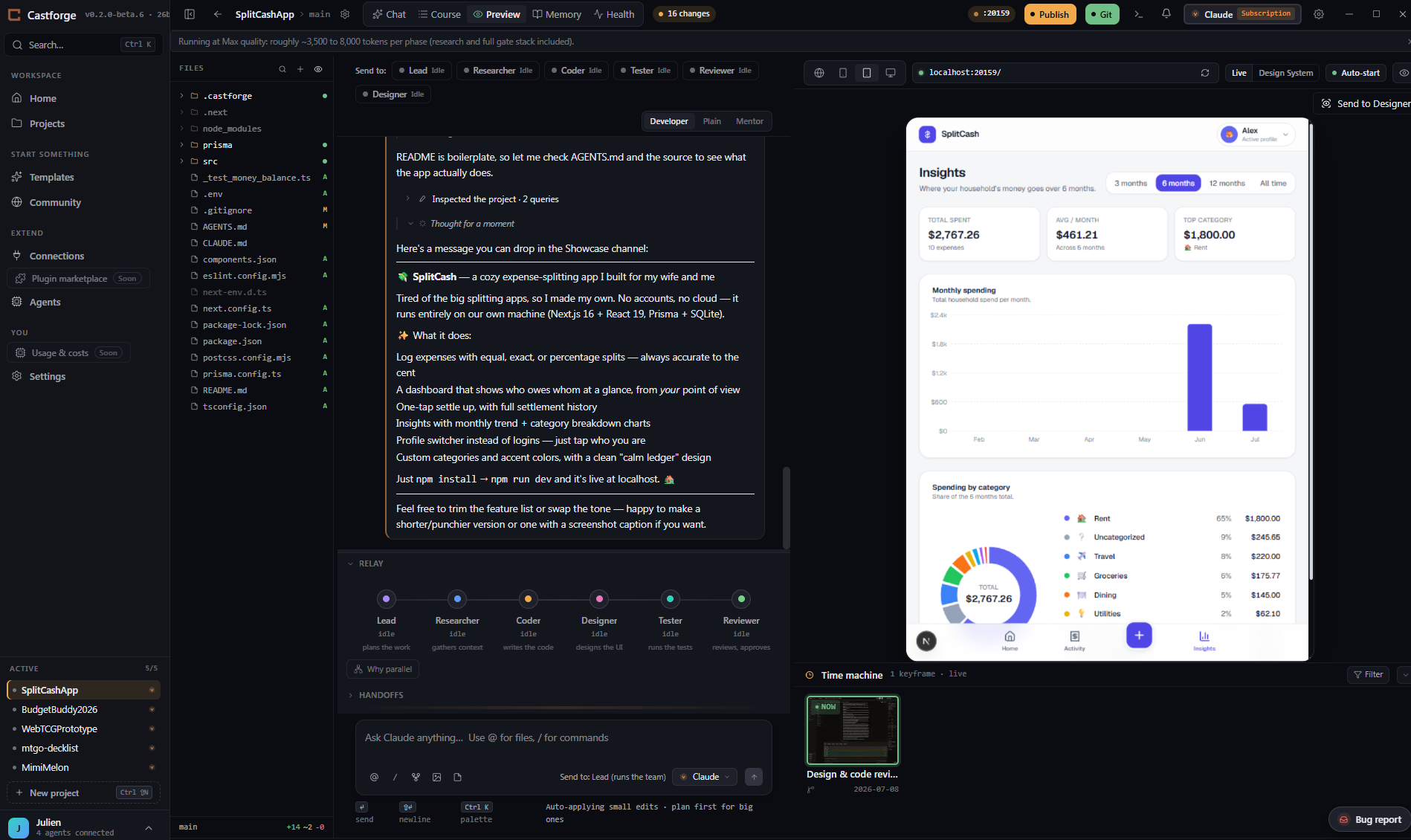
The Castforge workspace: a role lane with Lead, Researcher, Coder, Tester, Reviewer, and Designer handing off live, next to a live preview of the app being built.

Connect up to 17 AI coding agents, five with a free or subscription sign-in.

GitHub Copilot Free Claude OpenAI Codex Google Gemini OpenRouter Cursor Factory Droid Local models See the roadmap →
Connections

Bring the subscriptions you already pay for.

Connect the AI you already have and the services your app runs on, all from one screen. Sign in with a subscription, paste an API key, or start free with a GitHub Copilot sign-in. No per-token bills, and everything stays on your machine.

  • Sign in with Claude, ChatGPT, or Google, or add your own API key. One is plenty to start.
  • Wire in GitHub, Vercel, and Supabase as tools your agents can use, explained in plain language.
  • Run two or more live at once to put a full team on the board.
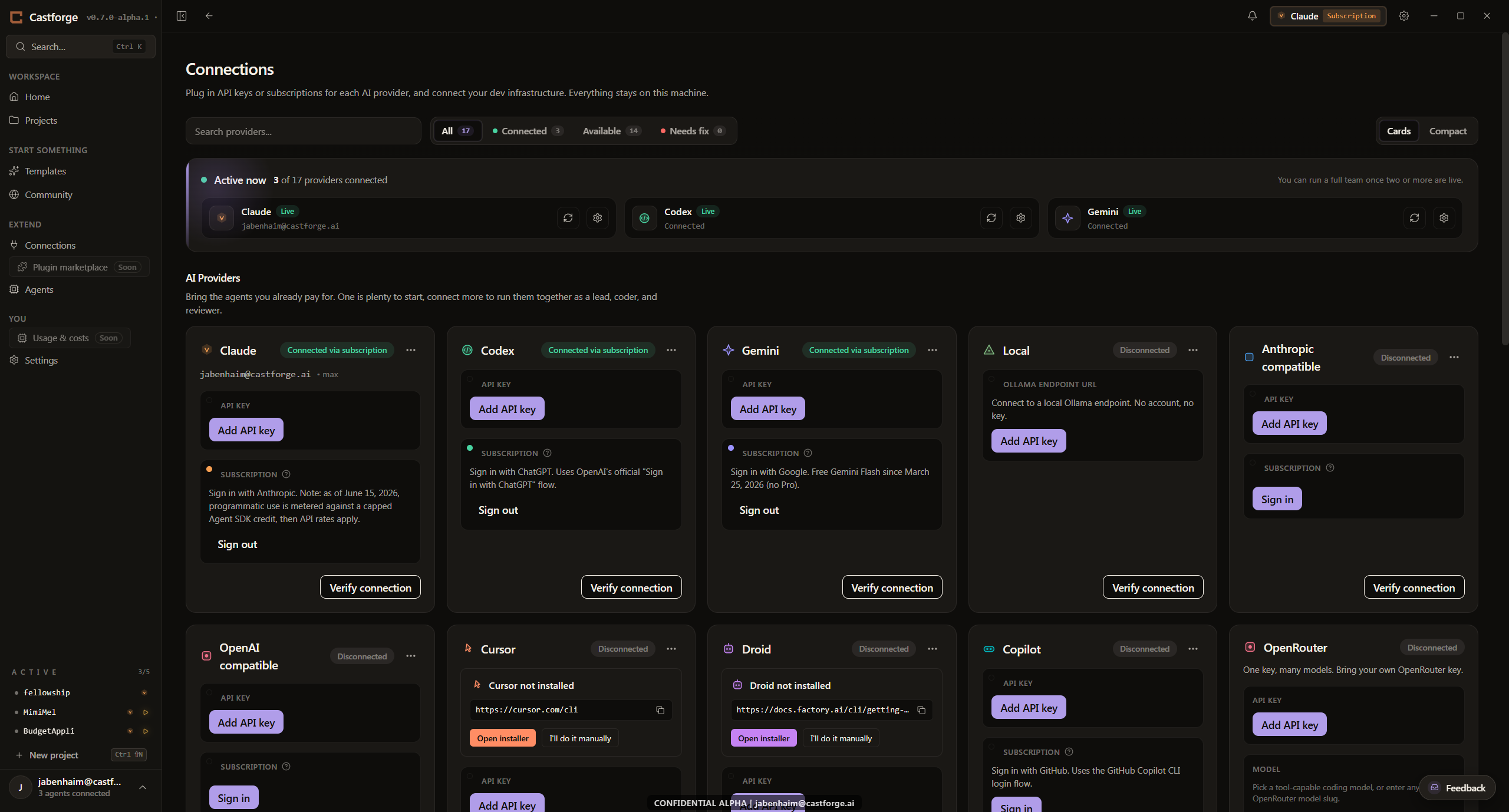
The Castforge Connections screen: Claude, Codex, and Gemini connected via subscription, with GitHub, Vercel, Supabase, Cloudflare, and Stripe available as dev infrastructure.
Multi-agent teams

Give every job to the agent best at it.

Castforge runs each project as a real team. A Lead breaks the work into a plan. Coders build it. A Tester and a Reviewer check it. A Designer guards the look. You assign which agent fills each role, and pick the model per seat.

  • Presets to start fast. Solo, Pair, Trio, or build a custom team.
  • Roles hand off to each other and run a review loop until the work holds up.
  • A Designer role reviews the UI against a design spec, not just the code.
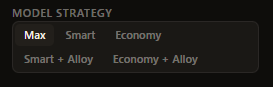
The Castforge model strategy control, with Max, Smart, and Economy tiers.
Set a model strategy per task, from Max quality to Economy.
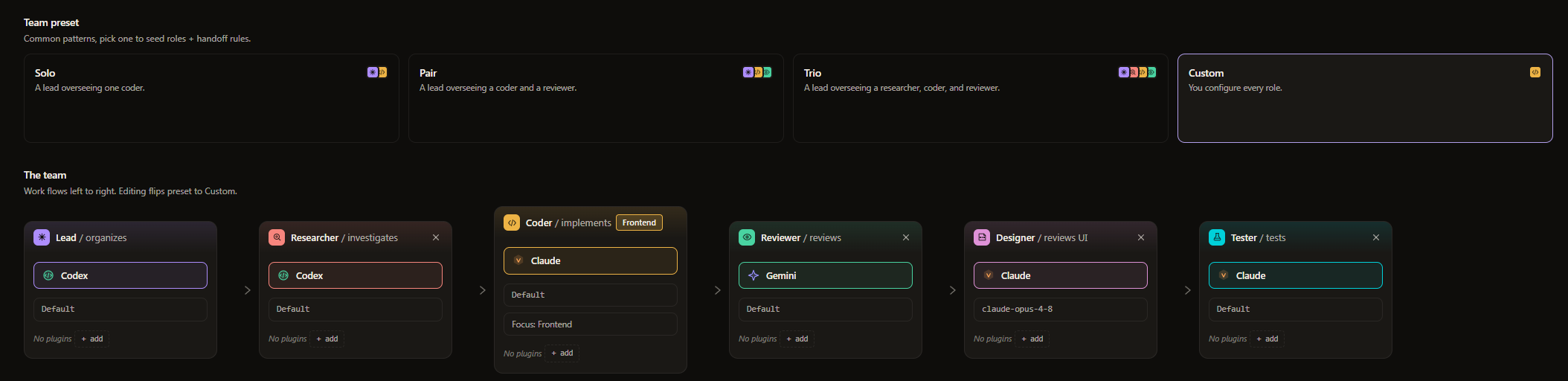
The Castforge team roster: Lead, Researcher, Coder, Reviewer, Designer, and Tester, each labeled with the model powering it.
Live preview

See your app as you build it.

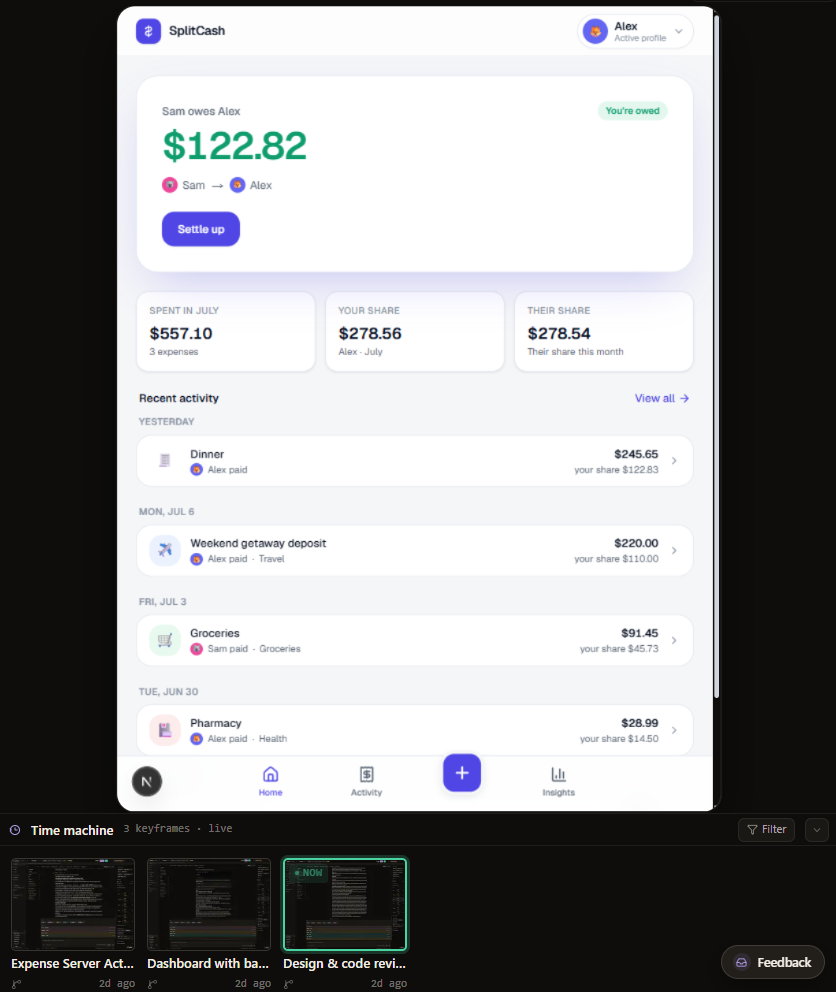
Watch your app render live as the team works. Frame it for desktop, tablet, or phone. Step back through changes with Time Machine and pick up from any point.

  • Live preview with desktop, tablet, and phone frames.
  • Time Machine: scrub back through snapshots of your app.
  • Permission modes: Careful, Balanced, or Autonomous. You decide how much rope.
Castforge live preview with the Time Machine drawer showing keyframe snapshots you can step back through.
Course board

Plan the work. Watch it ship.

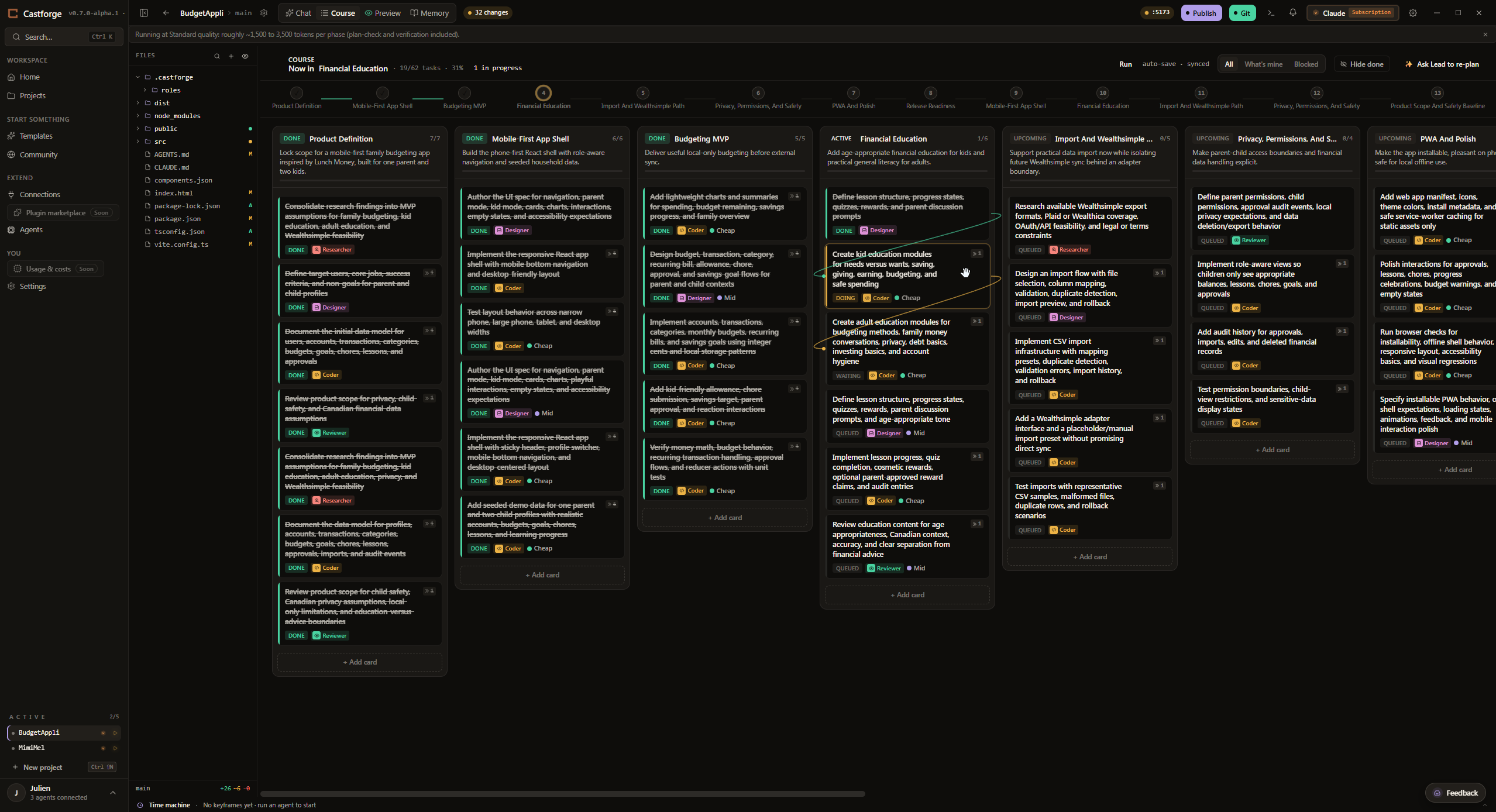
The Lead drafts a phase board for each project. Cards move as the team works, and dependencies are enforced, so nothing starts before the work it needs is done.

  • Lead agent drafts plans automatically for each project.
  • The Lead drafts the plan; cards move as the team works.
  • Dependencies are enforced so nothing ships out of order.
The Castforge Course board: phases laid out as columns with task cards tagged by role, one card marked as doing.
Project memory

It remembers why, not just what.

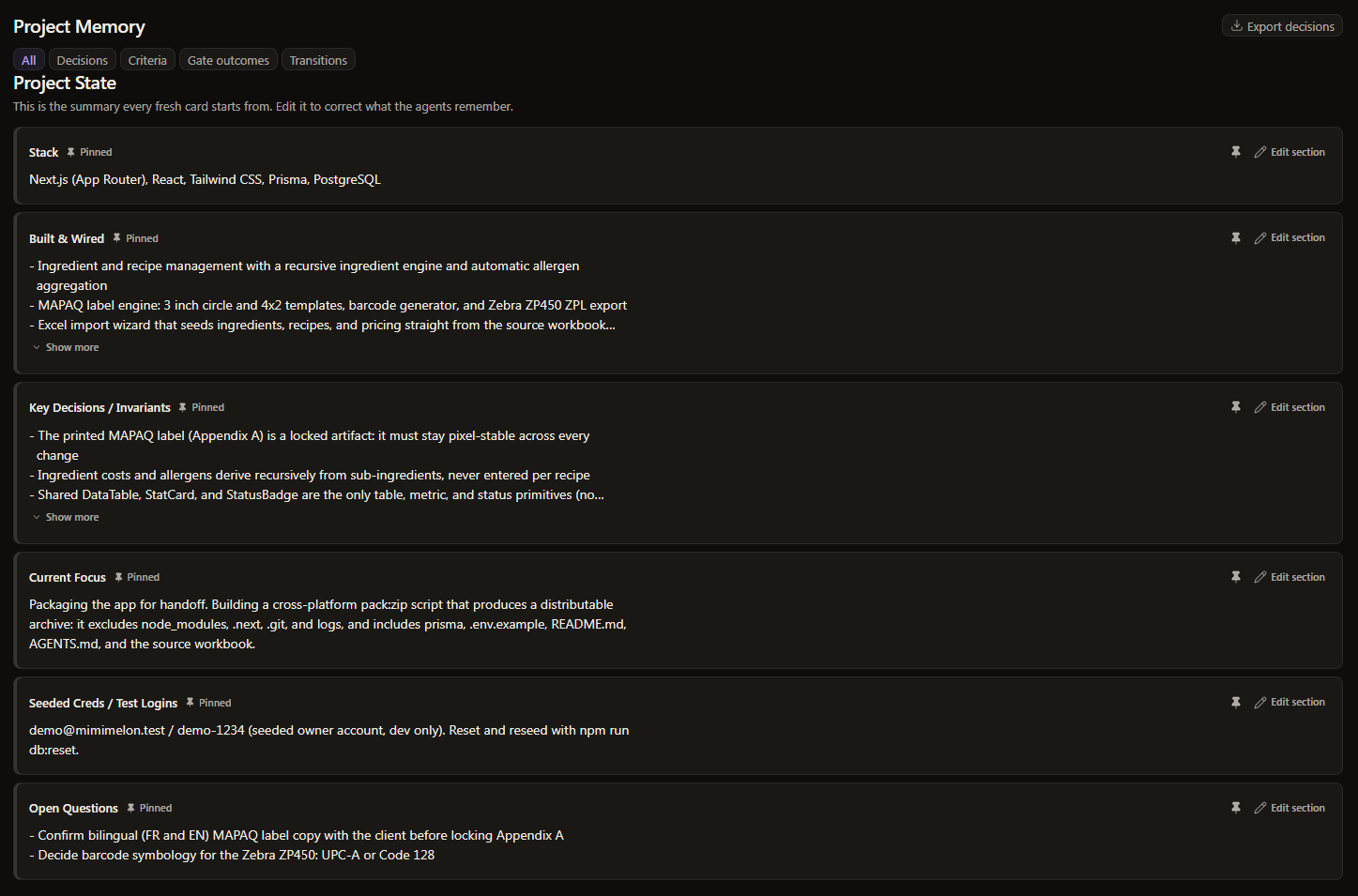
Castforge keeps a living summary of every project: the stack, what's built and wired, the key decisions and invariants, and the current focus. Every fresh agent reads it before touching the work, so context survives a new card, a crash, or a restart with no lost ground.

  • A shared project state the whole team starts from, editable any time to correct what the agents remember.
  • Backed by an append-only ledger you can filter by decisions, criteria, gate outcomes, or transitions. Nothing is ever overwritten.
  • Export to a decisions.md file in your project, so the history commits and reviews alongside your code.
The Castforge Project Memory tab showing the Project State summary: Stack, Built and Wired, Key Decisions and Invariants, Current Focus, Seeded Creds, and Open Questions, with filter tabs for decisions, criteria, gate outcomes, and transitions.
Quality and review gates

A quality bar built into the team.

Pick how much checking each project gets with a quality tier, and the tier decides which review gates run: the Lead's plan-check before any code is written, and a goal-backward verification of the finished work against its acceptance criteria.

  • Three tiers, from a fast Draft run to a Max run with research and testing on top of the full gate stack.
  • The plan-check gate catches a weak plan early; the verification gate checks the result against the goal.
  • When a tier turns a gate off, Castforge says so. A skipped gate is never shown as a silent pass.
The Castforge quality tier control: Draft (light), Standard (balanced), and Max (full). Draft is code only, Standard adds plan-check and verification, and Max adds research and testing.
Plan-check gate
before any code is written
Goal-backward verification
delivered work vs. the acceptance criteria
Backend pieces

Drop in the parts that are a pain to wire up.

Auth, a database, payments, email, file storage, scheduled jobs, tests. Each one is a short guided setup instead of an afternoon of boilerplate.

Auth
Sign-in, sessions, and protected routes, set up for you.
Database
A schema, migrations, and queries wired to your app.
Payments
Checkout and billing flows scaffolded, ready to test.
Email
Transactional sends and templates, hooked up.
File storage
Uploads and downloads with a storage backend.
Scheduled jobs
Cron-style tasks that run on their own.
Tests
A test harness the Tester role can run and extend.
Integrations
GitHub, Vercel, and Supabase, connected from setup.
Publish

Ship your web app to the web.

Castforge drafts code signing, custom domains, screenshots, and store-listing drafts, you review, then publish your web app. Web publishing is coming soon, with mobile and desktop targets to follow.

SoonWeb SooniOS SoonAndroid SoonDesktop
deploy
Publish to web
coming soon: your own Vercel URL + custom domain
How it works

Three steps to a working team.

STEP 01

Connect your AI.

Sign in free with GitHub Copilot, bring a subscription you already pay for (Claude Pro, ChatGPT Plus), or add your own API key. Castforge launches each agent's own secure login, so we never see your password. Requests go from your machine straight to your chosen provider.

STEP 02

Pick a starting point.

Open an existing project or start fresh. The Lead suggests a team and drafts a plan you can adjust before anything runs.

STEP 03

Steer it to done.

Watch the board, preview live, approve or redirect. You are always in control, at any point in the work.

How it compares

Built for a team, not a single agent.

Plenty of tools now run an AI coding agent. Castforge is built for a reviewed team of agents from every major provider, in one Windows app, that ships to your own cloud. Here is how the main ways of working line up.

Capability CastforgeWindows workspace First-party appsClaude Code, Codex, Antigravity AI coding IDEsCursor, Copilot, Devin Open-source orchestratorsOpenCode, Conductor, AionUi
Every major coding agent in one app Claude, Codex, Gemini, Copilot, and more Its own models only One or two, its way Varies by tool
A reviewed team that plans, builds, tests, and checks Built in, per task You assemble it Not offered Parallel, you review
Agents provision and deploy your own backend In preview, with a safety gate Not built in Not built in Not built in
Remembers your project across restarts Written to disk, reloadable Session-bound Session-bound Per run
Uses the AI accounts you already have Your sign-ins or your keys Its own subscription Billed by the tool Your sign-ins or keys
Native Windows desktop app First-class Yes Yes Some are Mac-first
Guided for developers who avoid the terminal Board, roles, one click Improving Editor-first Power-user tools
Free to start Free during early access Some free tiers Free tier, then paid Open source

Comparison reflects each category's typical product as of July 2026. This space moves quickly and every tool keeps adding features. Castforge is in active development, and the capabilities above describe the current build and its connected integrations.

On the roadmap · Coming soon

Where Castforge is going.

These are not live yet. Here is what we are building next.

Coming soon

Even more agents.

Connect up to 17 AI coding agents. Five have a one-click path today: GitHub Copilot (free), Claude, OpenAI Codex, Google Gemini, and local models. Bring your own API key for the rest.

Coming soon

A team that talks to itself.

Per-role work logs, and roles that can ask each other for help through the Lead.

Coming soon

Beyond Windows.

macOS and Linux builds, and a mobile companion to answer your team's approval prompts from your phone.

Pricing

Free during early access.

Castforge is free while it is in early access. Connect the AI you already have, a free GitHub Copilot sign-in, a subscription you already pay for, or your own API key, and just start coding. Each provider bills you directly for model usage, and Castforge never marks it up. We may add paid plans later; if we do, we will say so clearly first.

What you pay: Castforge itself is free during early access. Because you bring your own AI, you pay each provider (Anthropic, OpenAI, Google, or GitHub) directly for model usage at their price. Castforge never includes model credits and never marks them up.
FAQ

Questions, answered plainly.

Do I need an API key?
No. The fastest start is a free GitHub Copilot sign-in. You can also bring a Claude Pro or ChatGPT Plus subscription, or add your own API key. Whatever you choose, the provider bills you directly and Castforge never marks it up.
Does my code leave my machine?
No. Your project files stay on your filesystem. We store only your account, anonymous usage stats, and crash diagnostics.
What does Castforge cost?
Castforge is free during early access. There is nothing to buy right now. You bring your own AI, so each provider bills you directly for model usage. We may add paid plans later, and we will say so clearly before anything changes.
Which agents work?
Connect up to 17 AI coding agents. Five have a one-click path today: GitHub Copilot (free), Claude, OpenAI Codex, Google Gemini, and local models. Bring your own API key for the rest.
Is there a macOS or Linux version?
Windows is the v1 target. macOS and Linux are in active development.
Can my team use it together?
Castforge runs a full AI dev team on every project, Lead, Coder, Tester, Reviewer, Researcher, and Designer, and that is free during early access. Shared setups and org controls for larger human teams may arrive with a later plan. Join the beta to get started.
Free during early access

Your AI dev team is one sign-in away.

Join the beta and we will email you when it is your turn. Then sign in free with GitHub Copilot and watch a real team plan, build, test, and review on a live board, or bring a subscription or your own key.

Windows 11+ · macOS & Linux coming soon · v1.0.0